

Sleep score explained: the app's formula and an example
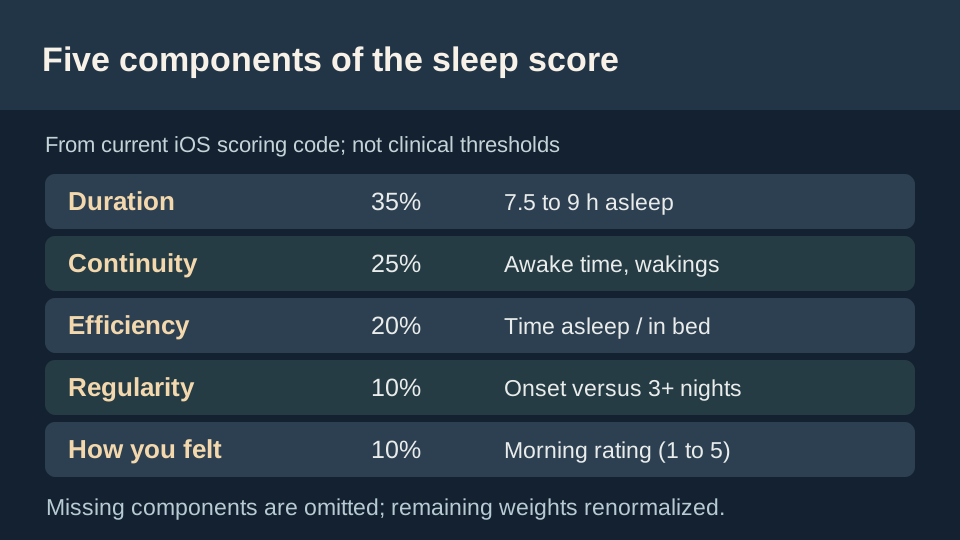
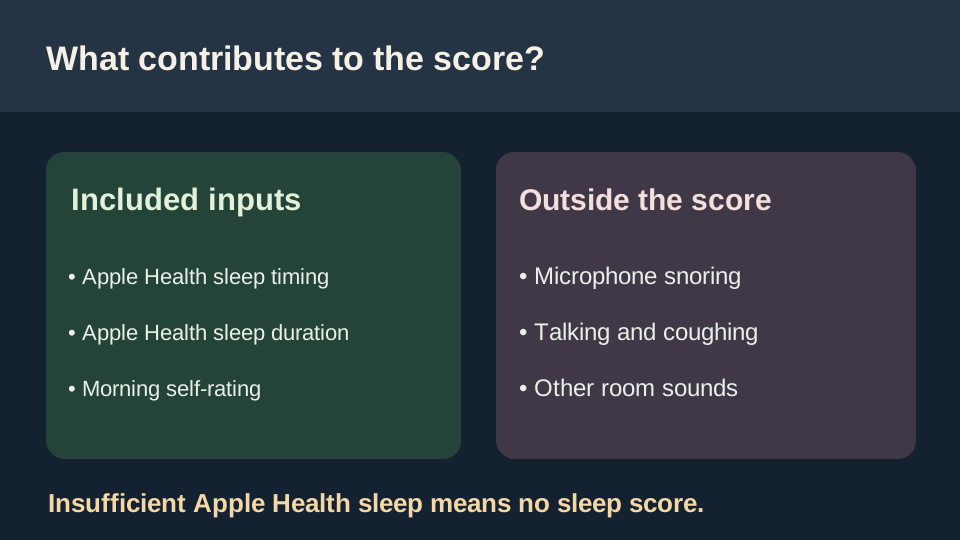
A sleep score is an app-specific summary of available sleep observations, not a clinical health grade. This app weights sleep duration (35%), continuity (25%), efficiency (20%), regularity (10%) and your morning restfulness rating (10%). The score uses Apple Health sleep data and leaves out snoring and other microphone sounds.
Last reviewed 22 October 2026. General information, not medical advice.
On this page6 sections
Five components and their exact weights
The app takes a weighted average of the components available for that night. Each component is scored from 0 to 100. These are product rules, not medical thresholds or a universal definition of good sleep.
- Duration, 35%. Full points at 7.5 to 9 hours asleep; a linear decrease below 7.5 toward zero at 5 hours and above 9 toward zero at 12 hours.
- Continuity, 25%. Begins at 100 with 5 minutes or less awake after sleep begins, reaches a base of zero by 45 minutes awake, then subtracts six points per recorded awakening (never below zero).
- Efficiency, 20%. Time asleep divided by time in bed; zero at 75%, full points at 95%, and linear between them.
- Regularity, 10%. Difference between sleep onset and the average from at least three previous nights; full at 10 minutes or less difference and zero at 75 minutes or more.
- Restfulness, 10%. Optional morning rating from 1 (0 points) to 5 (100 points).
Components without available data are omitted, and the remaining weights are renormalized. Do not assume every night uses the same number of components.
Worked example: 82 points from a fictional night
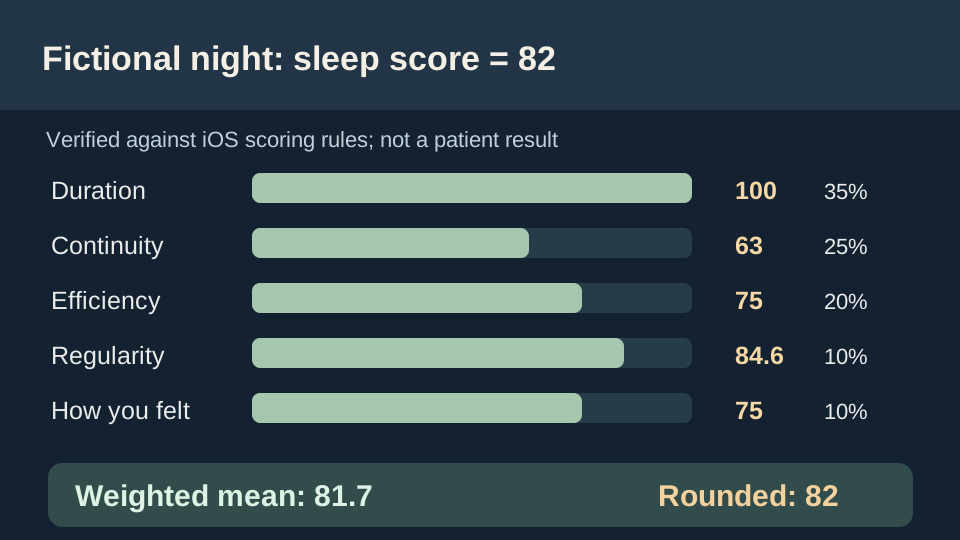
Consider a fictional night with 8 hours asleep in approximately 8 hours 53 minutes in bed (90% efficiency), including around 38 minutes before sleep onset and 15 minutes awake afterward, two awakenings, a 20-minute onset difference from earlier nights, and a restfulness rating of 4 out of 5.
The duration component is 100. Continuity is 75 minus two times six, or 63. Efficiency is 75. Regularity is approximately 84.6. Restfulness is 75. The weighted result is (100×35 + 63×25 + 75×20 + 84.6×10 + 75×10) / 100 = 81.7, rounded to 82.
The example is calculated using the app's current scoring functions. It is not a patient's result, a screenshot, or a prediction of an individual night's health.
What data comes from Apple Health versus the microphone?
Duration, continuity, efficiency and sleep timing depend on available sleep records from Apple Health. The optional restfulness component comes from your own rating. The microphone captures sound and helps supply a separate nighttime recording but does not estimate those sleep-stage or sleep/wake measurements.
A supported Watch or another compatible Apple Health sleep data source can supply measurements; exact availability varies. Apple's sleep-stage white paper describes its own estimation approach [1].
When the app shows 'Not enough data' instead
The current scoring gate requires at least three hours asleep in Apple Health, two hours of captured audio, and audio coverage overlapping at least half of the Apple Health sleep period. Without adequate Apple Health sleep data, a sleep score is not shown.
Missing inputs never count as zeros inside the score; if a whole score cannot be computed honestly, the app does not invent one. This is particularly important when comparing nights after interrupted recording.
Troubleshoot a missing or unexpected score
Start by checking the inputs, not the number. Open the iPhone Health app and inspect the Sleep record for that night. A night can have audible clips but still lack enough Apple Health sleep measurements to support a score. Likewise, Apple Health may show sleep time while this app lacks sufficient overlapping audio coverage.
The app's published scoring conditions above are product rules, not health requirements: at least three hours of Apple Health sleep, at least two hours of captured audio, and recorded time overlapping at least half the sleep period. No score means these conditions or necessary inputs were not met; it does not mean your sleep was unhealthy.
- No Apple Health night: check whether a compatible device or data source actually recorded sleep, and whether the app can read that information.
- Some audio but no complete night: look for intervals labelled not recorded; check how to set up and review a sleep recording before another attempt.
- Missing a component: an optional morning rating or prior-night history may be unavailable; the score uses only eligible components and normalizes their remaining weights when enough overall data exists.
- Scores differ across nights: check data sources and coverage before interpreting a change as better or worse sleep; microphone snoring clips are not part of this formula.
For how estimated stages get into Apple Health, see sleep stages explained. If you need a qualitative record even when no score appears, use the sleep diary template.
What is a good sleep score?
For this app, values of 85 or more are labelled 'Great sleep', 70 to 84 'Good sleep', 50 to 69 'Fair sleep', and below 50 'Low sleep score'. These are in-app presentation bands, not clinical cutoffs. Apple's sleep score uses a different weighting than this app: duration (50 points), bedtime consistency (30) and interruptions (20), according to Apple's own explanation.
Your own changes across similarly measured nights can be more useful than comparing scores from unrelated apps. Scores are not evidence that you do or do not have a sleep disorder. Learn how sleep stages work and why night awakenings do not always mean poor sleep [2].
In the app
See why a score changed
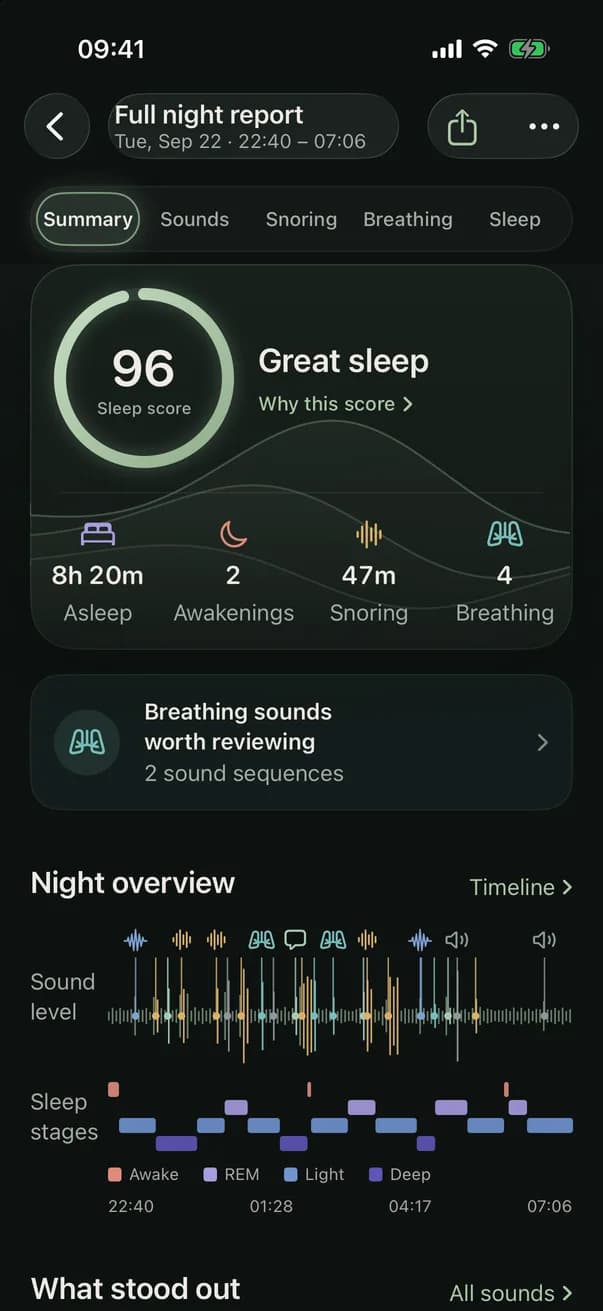
With a subscription and sufficient Apple Health data, open the night report to review the sleep-score breakdown. The five weighted components explain the number; sound clips and breathing observations are displayed separately and do not contribute to it.

Questions
Can a microphone calculate my sleep score by itself?
No. The current app needs adequate Apple Health sleep records as well as minimum recording coverage. Snoring and sound classifications are excluded from the sleep-score formula.
Why do I see no sleep score?
A missing Apple Health sleep record, fewer than three hours asleep, fewer than two hours recorded, or less than 50% recording overlap with the sleep period can prevent scoring.
Are sleep-score numbers comparable between apps?
Not reliably. Different apps use different inputs and formulas; the thresholds above describe this app only.