

Sleep recorder app: what it hears at night, and what it can't tell you
An iPhone sleep recorder captures nighttime sound so you can listen back for snoring, sleep talking, coughing or room noises. Apple's Voice Memos can save a long recording; a purpose-built sleep recorder organizes possible sound events into clips and a timeline. Neither microphone method measures sleep stages, oxygen or breathing airflow. Wearable sleep estimates are a separate data source.
General information, not medical advice.
On this page6 sections
Five kinds of sound
A useful recorder sorts the night rather than handing you one long file. The app sorts what it finds into five categories:
- Snoring: how much, when, and how strongly compared with your room.
- Sleep talking, including mumbling and laughing. Speech is never transcribed.
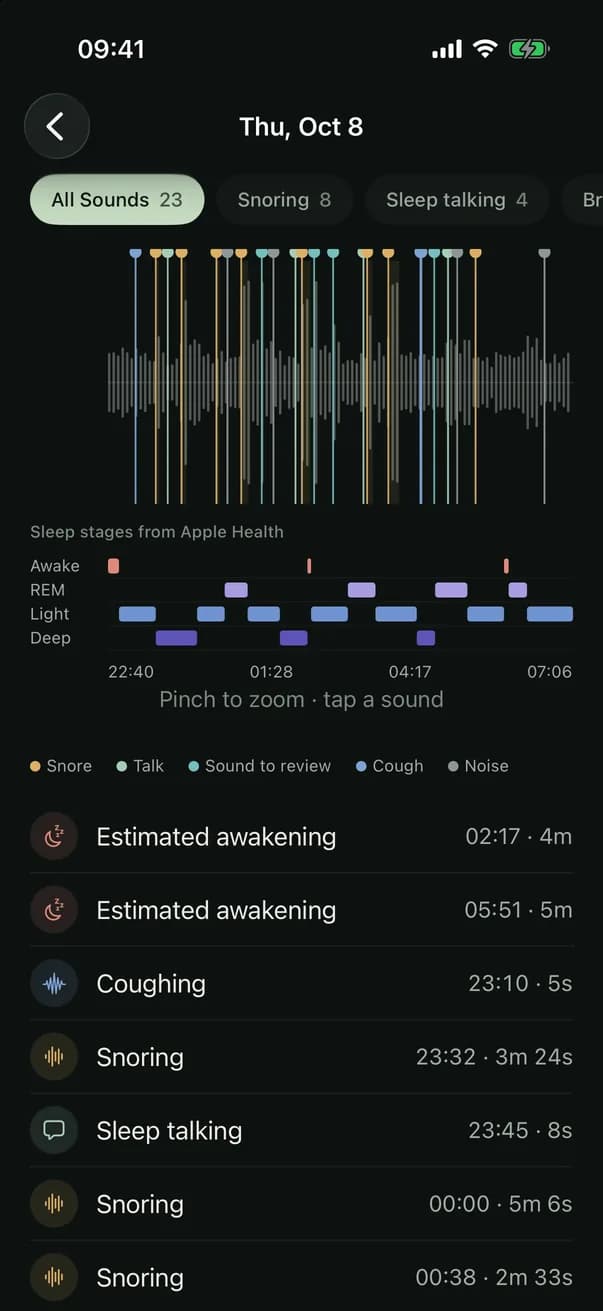
- Breathing sounds: gasp-like sounds, audible breathing, and sequences where snoring or breathing gives way to a quieter stretch and then a sudden sound, marked "Sound to review" on the timeline.
- Coughing, always as its own category.
- Noises: everything else, such as a partner, a pet, a door or traffic.
Detection can miss a sound or give it the wrong label. Suggested events are saved as replayable clips; a missed event may not have its own clip, particularly in an event-only mode. This site is made by the app's developer; the same questions are worth asking of any recorder.
Voice Memos versus a sleep recording app
If you only need raw audio from one night and are willing to review it yourself, Apple's Voice Memos can capture a manual recording [1]. A dedicated sleep recorder helps navigate suggested moments, not obtain a more medical measurement. Neither method guarantees uninterrupted audio through an entire night.
- Voice Memos: useful for a manual sound check, but expect to search through a long file yourself and check storage and recording conditions on your phone.
- An event-based sleep recorder: organizes clips by suspected sound and time so you can start with potential snoring or talking; its automated labels can be wrong.
- Full Recording: retains a wider span of captured sound than suggested clips alone. An interruption still leaves an interval that cannot be replayed; the report marks missing capture as not recorded.
- Neither option: identifies the person making a sound or proves how long you slept. See the snore recorder guide when your only question is snoring.
Smart clips versus Full Recording
Smart Recording is designed to retain the sound events it recognizes as short clips with some preceding audio. Its clip list can be incomplete or mislabelled; a quick morning review may save listening time, but no time saving or accuracy is guaranteed.
Full Recording retains wider audio alongside suggested highlights for stretches the app actually captured, so you can check an unflagged time. It cannot recover audio lost while recording was interrupted. You choose how long audio is kept (7, 30 or 90 days, or until you delete it) in Settings, Storage & Privacy. Export Recordings remains available after a subscription ends, although recording new nights and viewing reports require a subscription.
Recording a night isn't tracking sleep
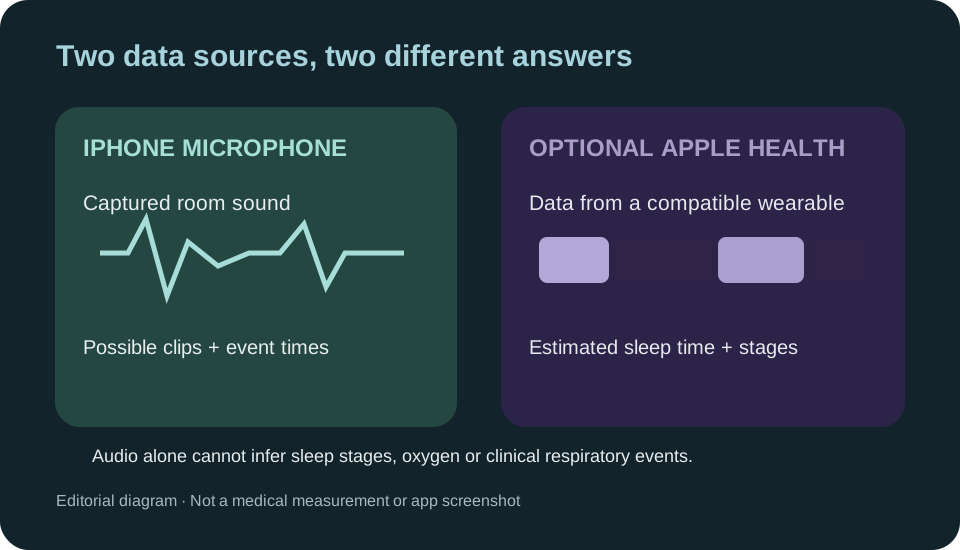
A microphone captures audible events and their timestamps, not consciousness or sleep stages. Recording duration is therefore not time asleep. When you explicitly connect a compatible wearable through Apple Health, its estimated sleep stages, time asleep and awakenings may be shown separately; they do not come from microphone audio. A clinical sleep study uses additional sensors [2].
Two things close together in time, such as a door and an awakening, don't mean one caused the other.
How to record yourself sleeping on your phone
A night's recording is only as good as the setup:
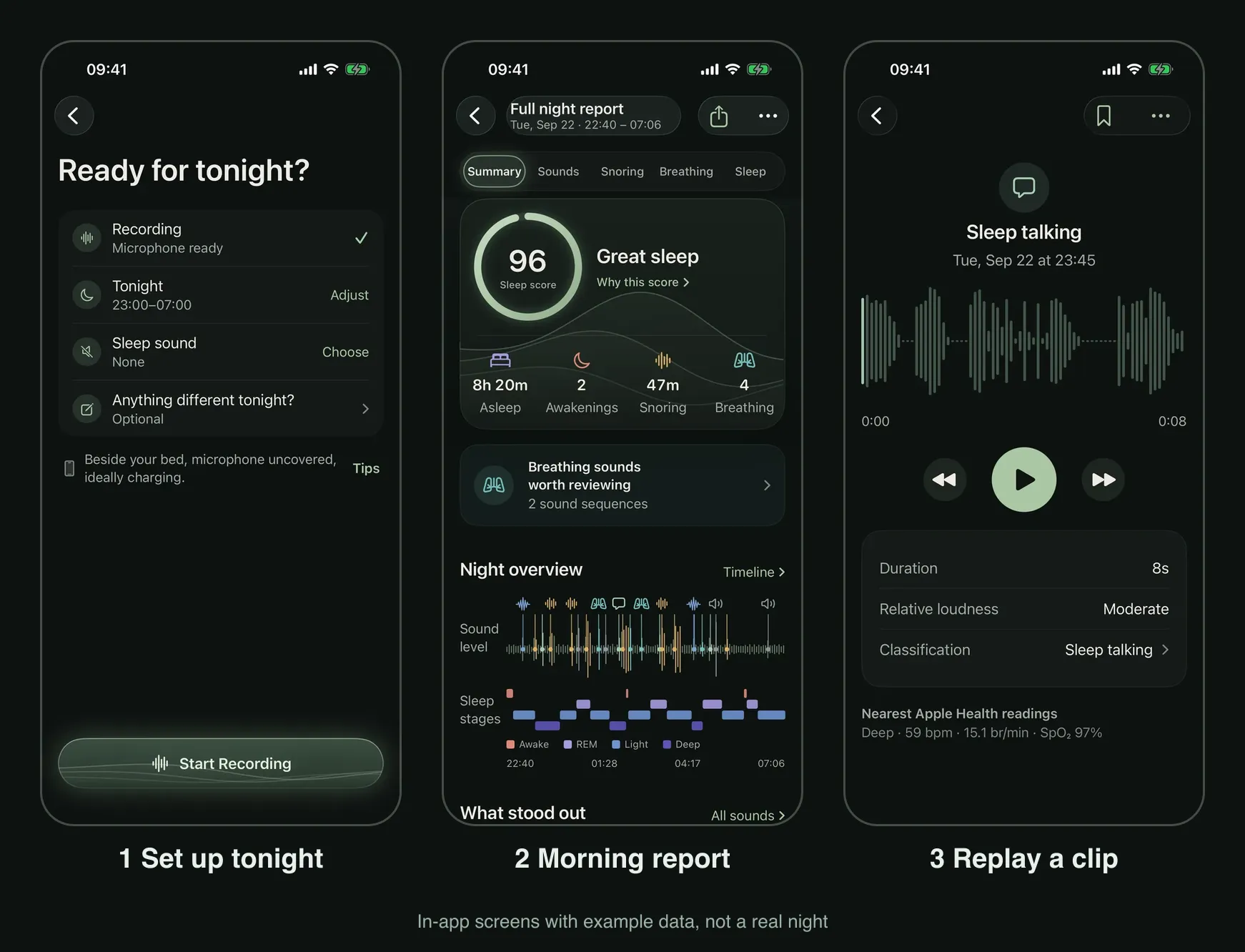
- Put the phone in the same spot each night, microphone uncovered. Charge it in the open, never under a pillow or blanket [3].
- Ask anyone who shares the room for agreement before capturing bedroom speech.
- Record several ordinary nights; any one night can be unusual.
- Note anything different before bed, such as a cold, a drink or a late meal.
- In the morning, check the recorded duration and any periods marked not recorded, then replay the highlights and use Full Recording for wider context only if audio was actually captured.
More on placement in how to record yourself sleeping.
What it's good for, and what it isn't
A recording can help you listen for a possible snore, speech or an unfamiliar sound at 3 a.m., but a clip does not always identify its source. Audio may also help you describe what was heard to a clinician. It is not a sleep test: consumer microphones do not measure airflow or oxygen, and an unrecorded or uneventful night cannot rule out a sleep disorder [4].
In the app
A night in the app
The app is designed for locked-screen sessions. If sound stops reaching it, for example during a call, the report marks that stretch as not recorded rather than counting it as quiet. The morning report organizes suggested sound events into a timeline, with separate views for summaries, sounds and snoring. Replay a clip before trusting its category; the screenshots contain example data, not another person's night or clinical findings.
Recording and reports need a subscription; plans and prices are shown in the app.

Questions
Can't I just leave a voice recorder running overnight?
Voice Memos can save a long audio recording [1], but check its actual duration and any interruptions. A sleep recorder can make selected moments easier to find; its clips may omit or mislabel a sound. Full Recording retains wider audio only for intervals actually captured, so you can replay context around a clip without assuming an uninterrupted night.
Does a sleep recorder tell me how many hours I slept?
Not from sound alone. The app shows how long it recorded, and time asleep only when Apple Health has sleep data from a watch or another tracker.
How long is the audio kept?
In Settings, Storage & Privacy, choose whether recordings are kept for 7, 30 or 90 days, or until you delete them. Recordings and reports stay on the iPhone and are excluded from iCloud and device backups. Export Recordings stays available after a subscription ends, but a copy you share is controlled by its destination.
Are my recordings uploaded?
The app processes sound on the iPhone without an account, and its recordings and reports are excluded from iCloud and device backups. Exporting or sharing creates a separate copy that may be stored elsewhere. Apple's Voice Memos has its own optional iCloud synchronization [1]. See the Privacy Policy for details.
Sources
- 1Apple. Make a recording in Voice Memos on iPhone. iPhone User Guide.
- 2MedlinePlus Medical Encyclopedia, National Library of Medicine (NIH). Polysomnography. Reviewed May 2026.
- 3Apple. Important safety information for iPhone. iPhone User Guide, Apple Support.
- 4American Academy of Sleep Medicine. Consumer Sleep Technology: AASM position statement.